Another post, Another day
Interesting title. I know. I have a knack for those. It will become more evident as the posts pile up. To be honest it’s just making that title is the first creative thing I’ve done today, so I’m not complaining that it’s not Jim Carey material. I spent about 6 hours with Jeffrey from JNLHosting yesterday trying to get iPv6 working on the VPN I just got, and to no surprise from me in retrospect I’m back where I started with it- with just a tiny bit more understanding of iPv6, and a lot more frustration with it. I’ll probably just wind up putting that little bit to the side and work on other things like SpeechRecognition from Python or something. I have to reinstall lots of stuff. Yesterday I mentioned possibly having messed up my computer if I removed Python and…. I did. Had to do a fresh install. Thankfully something that would have taken half the day in the past I’ve shaved down to about an hour, would have been less if I had figured out backing up files a little more quickly. My /Home folder is on a second partition, so I didn’t have to backup any of my personal files, mostly just settings if I wished to move them back. So far I’ve kinda not done that. I didn’t have too much time after doing the install before Jeffrey and I started working on the server. I say “we” and it was only the both of us because he doesn’t have direct access to the server so he had to tell me what to do and I was typing the commands and crossing my fingers to an inevitably sad conclusion.
The really cool thing I figured out through all my iPv6 problems wound up not even being about the internet. I was watching a video on YouTube and the guy had a cool bash prompt and he even shared the script on how to make it work. I figured out how to add it to my system, and now my bash prompt looks like this!
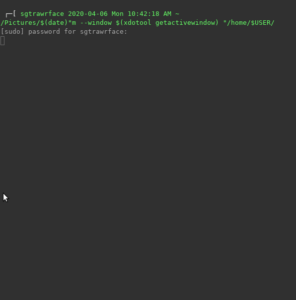
The prompt has two lines, starting with the current user, the date and time, and the current working directory. The line below it shows where the command it typed. I spend a lot of time in the terminal so it’s nice to be able to easily tell where the last chunk of command output starts so I don’t look at way too much information. The way this is setup it makes it really easy to not do that anymore. Kudos to whoever it was that made it work, the person who asked the question, and the uploader for actually giving the script out. The following is what is needed to be added to the ~/.bashrc on linux distros (at least mine, Ubuntu 18.04. I can’t testify for any other version of linux):
PS1=’\n \[\e[1;37m\]$(echo -e “\033(0lq\033(B”)[\[\e[0m\] \[\e[38;5;10m\]\u \D{%F %a %T %p} \w\[\e[0m\]\n \[\e[1;37m\]$(echo -e “\033(0mq\033(B”)[ —>\[\e[0m\] \[\e[1;32m\]’
trap ‘echo -ne “\e[0m”‘ DEBUG
I thought it was gonna be scary trying to get the script to work, but nope! Just need to open the .bashrc file in whatever editor you find nifty, add the above code to the end of the script, save, and restart all the command prompt windows you have open in order to refresh how the prompt is generated. I tried using the ‘restart’ command, but it unfortunately didn’t work.
Today though I’m back, and while still tired, a little more refreshed, and ready to conquer like I said, SpeechRecognition hopefully. I just need to remember to not delete Python. Been there, tried that, did not go well. If that gets too tiring I’ll switch to music over on my Discord, which can be reached in a link somewhere here on the site. I decided instead of livestreaming on Twitch my practices, which are mostly my practicing my practices, I’d do practices on a voice channel on my Discord until I had a good routine on practicing for a couple hours at a time. After that I’ll get back on the streaming my practices. I just didn’t want to be awkward on stream for long periods of time and not doing quality anything. We’ll get there though.
After a couple of hours speech recognition is actually looking pretty promising. I just figured out how to make the program run a bash command. Next I’ll do some digging to see if I can make the script check for bash commands based off what I say, so it would cut down on how much coding I’d have to do. The most I really WANT to get into when it comes to nitty gritty line-by-line details of making this work is putting easier to say aliases for commands in my .bashrc file. If I get anyone asking I’ll wind up putting the source code up someplace probably. Hopefully it doesn’t get too crazy. The biggest issue I’ve always faced with coding isn’t getting confused by the commands. I get confused by the framework and how to go about something. I just made sure I knew how to get the script to test for a spoken word in a text file, and that means I can write all of the commands separate from the main script, cutting down on how large that file gets, and makes everything a bit easier to read.
I’ve warmed up with some Speech to Text, and now I’ll get started on some OpenCV stuff. I did it this way since I knew a LITTLE bit about how that works and should look, and since it’s all Python in the end, I thought it may be a good refresher on making myself feel like a Python Hero towards the beginning to middle or maybe end of the project. Whenever that will be. Gonna be working more on the Receipt thingy.
Kinda lied about the OpenCV stuff. Worked on the SpeechRecognition all day instead. Got reinvigorated to work on it after I had a breakthrough. I now have a program that will auto update the commands list based on the modules added to the main directory. The modules only need to have ‘from __main__ import *’ at the top of them and they can be used with speech to text! Pretty neat if you ask me. But I’m calling it a night there. It’s time to unwind and watch something online or something. Been looking at text all day today.
I hope you all have a wonderful evening.